
In this piece
A button appears only in the WordPress admin area. Its request includes a nonce. The callback saves a value. It is easy to look at that flow and feel that the permission check is already covered.
I would still ask one more question: what stops a different logged-in user from sending the same request for a post they cannot edit? The answer needs to exist on the server. Let’s make that boundary visible with a small REST endpoint.
Key concepts
Authentication Establishes which user is making the request.
Authorization Decides whether that user may perform this action on this item.
Nonce A time-limited token used by WordPress to help protect requests against CSRF.
The short version
- A valid nonce does not grant permission to edit a post.
- Check the capability for the specific object on the server.
- Validate the requested change and test the rejected requests too.
Keep the three checks separate
With WordPress cookie authentication, the REST API uses a wp_rest nonce to help verify requests from the logged-in session. That check does not answer whether the user should be allowed to change a particular post. WordPress explicitly says that nonces must not be used as authorization. They are also not single-use tokens; a valid token can be reused during its validity window.
| Check | Question | Example |
|---|---|---|
| Authentication | Who is making this request? | A WordPress user authenticated by the supported mechanism. |
| Authorization | May this user change this post? | current_user_can(“edit_post”, $post_id) |
| Input validation | Is this an allowed change? | reviewed must be a JSON boolean. |
Give the endpoint a small job
Our example records whether an editor has reviewed a post. It changes one private metadata value, _rr_reviewed. It does not publish the post, edit its content, or accept an arbitrary metadata key from the caller. Keeping the operation narrow makes it easier to reason about.
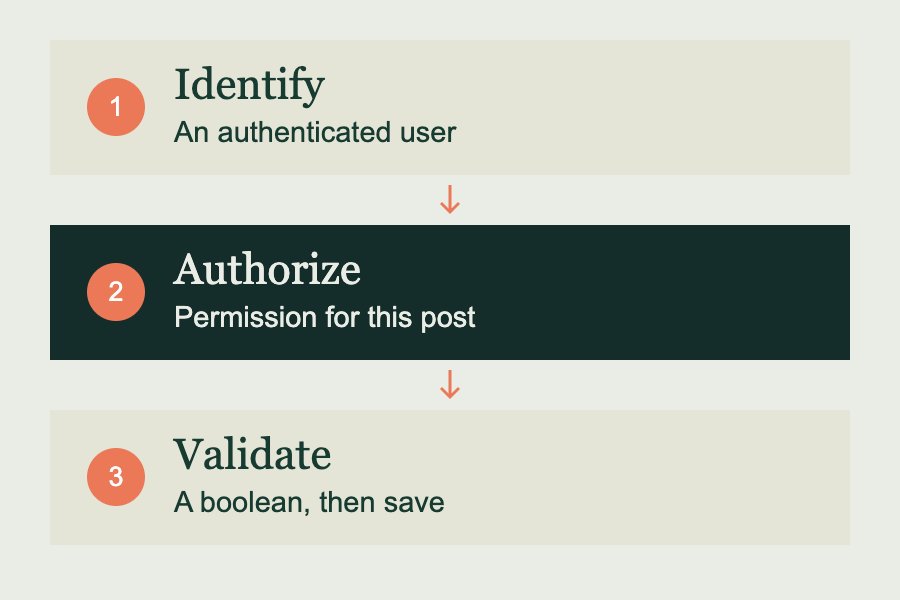
The key permission is current_user_can("edit_post", $id). WordPress maps that object-specific capability using the user and the post. This is more precise than checking a role name or merely checking whether someone is logged in. The current_user_can() reference explains the object ID parameter.
Put the permission check beside the route
To explore this on a disposable WordPress site, save the following as wp-content/plugins/reading-review-example/reading-review-example.php and activate it. This is a teaching endpoint; it is not installed by this article on your site.
<?php
/**
 * Plugin Name: Reading Review Example
 * Description: A small REST permission example for a test site.
 */
add_action('rest_api_init', function () {
    register_rest_route('reading-review/v1', '/posts/(?P<id>[1-9][0-9]*)', [
        'methods' => 'POST',
        'permission_callback' => function ($request) {
            $post = get_post((int) $request['id']);
            return $post && $post->post_type === 'post'
                && $post->post_status !== 'trash'
                && current_user_can('edit_post', $post->ID);
        },
        'args' => [
            'reviewed' => [
                'required' => true,
                'validate_callback' => function ($value) {
                    return is_bool($value);
                },
            ],
        ],
        'callback' => function ($request) {
            $id = (int) $request['id'];
            $reviewed = $request['reviewed'];
            $saved = update_post_meta($id, '_rr_reviewed', $reviewed);

            // false can also mean the value was already the same.
            if ($saved === false &&
                (bool) get_post_meta($id, '_rr_reviewed', true) !== $reviewed) {
                return new WP_Error('save_failed', 'Could not save the review.',
                    ['status' => 500]);
            }
            return rest_ensure_response([
                'id' => $id,
                'reviewed' => $reviewed,
            ]);
        },
    ]);
});
The permission_callback rejects missing items, other post types, trashed posts, and users who cannot edit the target post. The required reviewed argument accepts true or false as JSON booleans. The string "true" is deliberately rejected. See WordPress’s custom endpoint documentation for the route lifecycle.
The save check also handles a small WordPress detail: update_post_meta() can return false when the stored value already matches. Repeating the same review choice should still succeed. A failed write that leaves a different value produces an error instead.
Send the request through the right authentication path
For a logged-in browser using WordPress cookie authentication, send the REST nonce in the X-WP-Nonce header. Generate it server-side with wp_create_nonce("wp_rest") and pass it only to the intended logged-in page. Do not paste a fixed nonce into a public JavaScript file or cache a user-specific nonce as public HTML.
POST /wp-json/reading-review/v1/posts/123
Content-Type: application/json
X-WP-Nonce: <nonce from the current WordPress session>

{"reviewed": true}
This describes the request shape; 123 must be replaced with a real post ID. Without the matching logged-in session, copying a nonce into a request does not establish that user’s identity. External clients use an appropriate authentication method, such as application passwords over HTTPS. Follow the REST authentication documentation for that path.
Test the requests you want to refuse
| Request | Expected outcome |
|---|---|
| Authorized editor, valid JSON boolean | Save and return the requested state. |
| Same valid request again | Succeed without needing a changed database row. |
| Subscriber who cannot edit the post | Refuse the change. |
| Author targeting someone else’s post without permission | Refuse the change. |
| Missing or invalid cookie-auth nonce | Do not accept the protected write. |
| reviewed is “yes”, null, or omitted | Reject the invalid input. |
Use a second, less privileged account on the test site. Send a rejected request, then inspect the saved metadata using an authorized account or WP-CLI. The value should be unchanged. Repeat with an allowed request so you know the endpoint is not simply rejecting everyone.
Hiding a button is useful interface design. The permission callback is what enforces the rule when someone sends a request without using that interface.
Keep the boundary narrow as the feature grows
A real editorial workflow may need a review timestamp, a reviewer ID taken from the current session, and a history of changes. Decide what those fields mean before adding them. A boolean alone is not an audit trail, and “reviewed” should not silently mean “approved to publish.”
If you later accept text, add suitable validation and sanitization, then escape it for the context where it is displayed. Those tasks are separate from checking permission. WordPress documents both sanitizing input and escaping output.
Try it yourself
Choose one state-changing endpoint in a plugin you maintain. Identify the exact capability check, the object it applies to, and the allowed input. Then write down one request that should succeed and two that should fail. Test them on a staging site and inspect the stored result after each request.